SQL for Data Analytics
SQL is a powerful and essential tool for data analytics. If you practice queries like SELECT, WHERE, GROUP BY, JOIN, CASE, and LIMIT, you will build a strong foundation for real-world analysis.


SQL is one of the most important skills for anyone who wants to work in data analytics.
It helps you access data stored in databases, filter useful information, combine tables, and calculate important business results. In most companies, data is stored in multiple tables, so learning SQL is essential for turning raw data into useful insights. If you are a beginner, practicing the most important SQL queries will make you more confident in interviews and real projects. This article explains the core SQL queries every data analyst should know, along with simple examples and code.
SELECT
The SELECT statement is the starting point of almost every SQL query. It is used to retrieve data from a table. Without SELECT, you cannot view or analyze any records from the database.
For example, if you want to see all customer data from a table, SELECT allows you to display the columns you need. You can choose one column, many columns, or all columns depending on your task. This query is simple, but it is one of the most important commands in SQL.
SELECT *
FROM Customers;
This query returns all rows and all columns from the Customers table. If you want only specific columns, you can mention their names instead of using *.
SELECT customer_name, city
FROM Customers;
WHERE
The WHERE clause is used to filter data based on a condition. It helps you focus only on the records that matter. This is very useful when a database has a large amount of information, and you only need a small part of it.
For example, if you want to find customers from a specific city, WHERE can help you do that. You can also use it to filter by date, price, age, or any other condition. It makes your analysis more specific and efficient.
SELECT *
FROM Customers
WHERE city = 'Kathmandu';
This query returns only the customers who live in Kathmandu.
SELECT *
FROM Orders
WHERE order_amount > 500;
This query shows only the orders with an amount greater than 500.
ORDER BY
The ORDER BY clause is used to sort data in ascending or descending order. Sorting makes it easier to study data and find important values. You can sort by names, dates, sales, or any other column.
For example, if you want to see the highest sales first, you can sort the data in descending order. If you want to view names alphabetically, you can sort them in ascending order. This query is simple but very helpful for reporting and analysis.
SELECT *
FROM Orders
ORDER BY order_amount DESC;
This query sorts the orders from highest amount to lowest amount.
SELECT *
FROM Customers
ORDER BY customer_name ASC;
This query sorts customers alphabetically by name.
GROUP BY
The GROUP BY clause is used to group rows with similar values. It is often used with aggregate functions like SUM, COUNT, and AVG. This query is useful when you want summary information instead of raw records.
For example, if you want to calculate total sales for each city, GROUP BY makes that possible. It helps analysts answer business questions such as how many customers are in each category or what the average sales are in each region. This is one of the most useful queries in data analytics.
SELECT city, COUNT(*) AS totalcustomers
FROM Customers
GROUP BY city;
This query counts how many customers are in each city.
SELECT city, SUM(order_amount) AS total_sales
FROM Orders
GROUP BY city;
This query calculates total sales for each city.
HAVING
The HAVING clause is used to filter grouped results. It works after GROUP BY and is often used when you want to apply a condition to summary data. Many beginners confuse it with WHERE, but they are not the same.
WHERE filters individual rows before grouping, while HAVING filters the results after grouping. For example, if you want to show only cities with more than five customers, HAVING is the right choice. It is very helpful for report-based analysis.
SELECT city, COUNT(*) AS totalcustomers
FROM Customers
GROUP BY city
HAVING COUNT(*) > 5;
This query shows only cities that have more than five customers.
SELECT city, SUM(order_amount) AS total_sales
FROM Orders
GROUP BY city
HAVING SUM(order_amount) > 10000;
This query shows only cities where total sales are greater than 10,000.
DISTINCT
The DISTINCT keyword is used to remove duplicate values from the result. It is useful when you want only unique records. This query helps reduce repeated information and makes your result cleaner.
For example, if a table contains many repeated city names, DISTINCT will show each city only once. It is very helpful when you want to know how many unique categories, locations, or values are in your data.
SELECT DISTINCT city
FROM Customers;
This query returns only unique city names.
SELECT DISTINCT product_category
FROM Products;
This query returns only unique product categories.
COUNT, SUM, AVG, MIN, and MAX
These are important aggregate functions used in SQL. COUNT tells you how many rows are in a table. SUM gives the total of a numeric column. AVG calculates the average. MIN returns the smallest value, and MAX returns the largest value.
These functions are used in almost every data analytics report. They help you understand totals, averages, and limits in your data. With these functions, you can turn raw records into meaningful business insights.
SELECT COUNT(*) AS total_orders
FROM Orders;
This query counts all orders.
SELECT SUM(order_amount) AS total_sales
FROM Orders;
This query calculates the total sales.
SELECT AVG(order_amount) AS average_sales
FROM Orders;
This query calculates the average order amount.
SELECT MIN(order_amount) AS smallest_order
FROM Orders;
This query finds the smallest order amount.
SELECT MAX(order_amount) AS largest_order
FROM Orders;
This query finds the largest order amount.
JOIN
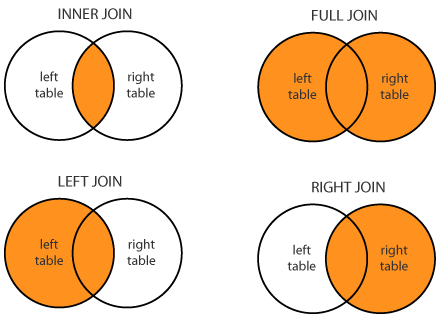
JOIN is one of the most important SQL concepts in data analytics. It is used to combine data from two or more tables using a common column. Since business data is often split across multiple tables, joins are necessary to get a complete picture.
For example, you may have one table with customer details and another table with order details. A join helps you connect them and analyze customer behavior along with purchase history. The most common joins are INNER JOIN, LEFT JOIN, RIGHT JOIN, and FULL JOIN.
INNER JOIN
INNER JOIN returns only the rows that match in both tables. If a record does not have a match in both tables, it is not included in the result. This join is useful when you only want matching records.
SELECT Customers.customer_id, Customers.customer_name, Orders.order_id
FROM Customers
INNER JOIN Orders
ON Customers.customer_id = Orders.customer_id;
This query shows only customers who have placed an order.
LEFT JOIN
LEFT JOIN returns all rows from the left table and matching rows from the right table. If there is no match in the right table, the result still shows the left table row, and the right table values appear as NULL.
SELECT Customers.customer_id, Customers.customer_name, Orders.order_id
FROM Customers
LEFT JOIN Orders
ON Customers.customer_id = Orders.customer_id;
This query shows all customers, even those who have not placed an order.
RIGHT JOIN
RIGHT JOIN returns all rows from the right table and matching rows from the left table. If there is no match in the left table, the left table values appear as NULL.
SELECT Customers.customer_id, Customers.customer_name, Orders.order_id
FROM Customers
RIGHT JOIN Orders
ON Customers.customer_id = Orders.customer_id;
This query shows all orders, even if some do not match a customer record.
FULL JOIN
FULL JOIN returns all rows from both tables. Matching rows appear together, and non-matching rows from either table still appear with NULL values on the missing side.
SELECT Customers.customer_id, Customers.customer_name, Orders.order_id
FROM Customers
FULL JOIN Orders
ON Customers.customer_id = Orders.customer_id;
This query shows all customers and all orders, whether they match or not.
CASE
The CASE statement is used to create conditions inside SQL. It works like an IF-ELSE statement. This query is useful when you want to categorize data based on specific rules.
For example, you can label sales as high, medium, or low depending on their value. CASE makes your analysis more flexible and readable. It is often used in reports and dashboards.
SELECT order_id, order_amount,
CASE
    WHEN order_amount > 1000 THEN 'High'
    WHEN order_amount >= 500 THEN 'Medium'
    ELSE 'Low'
END AS sales_category
FROM Orders;
This query classifies each order into a sales category.
LIMIT
The LIMIT clause is used to show only a certain number of rows from a result set. It is useful when you want to preview data instead of displaying everything. This is especially helpful when working with large tables.
For example, you can show the first 10 rows to check whether the data is loaded correctly. It saves time and makes results easier to read.
SELECT *
FROM Customers
LIMIT 10;
This query returns only the first 10 rows from the Customers table.
CONCLUSION
SQL is a powerful and essential tool for data analytics. If you practice queries like SELECT, WHERE, GROUP BY, JOIN, CASE, and LIMIT, you will build a strong foundation for real-world analysis. These queries help you retrieve, filter, summarize, and combine data in meaningful ways. The more you practice them, the more confident you will become in interviews, projects, and job tasks. Learning SQL step by step is one of the best ways to become job-ready in data analytics.