10 Things to keep in every website
Building a website is more than just creating beautiful pages and adding content. There are several technical elements that work behind the scenes to make your site more professional, discoverable, and user-friendly. Whether you're launching a personal blog or a business website, these ten components should be on your checklist.
1. Favicon
A favicon is that tiny icon you see in your browser tab next to the page title. It might be small, but it plays a big role in branding and user experience. When someone has multiple tabs open, your favicon helps them quickly identify and return to your site. Without one, you'll just see a generic browser icon, which looks unprofessional and makes your site forgettable.
Creating a favicon is simple. You need a square image, typically 16x16 or 32x32 pixels, saved in ICO, PNG, or SVG format. Most people use their logo or a simplified version of it. Once you have your favicon file, you link it in the head section of your HTML, and it will appear across all browsers. This small detail shows you care about the complete user experience.
2. Open Graph
Open Graph tags control how your website appears when shared on social media platforms like Facebook, Twitter, and LinkedIn. Without these tags, social networks will randomly pull content from your page, often resulting in awkward or incomplete previews that don't encourage clicks.
Open Graph tags let you specify the title, description, and image that appear in social shares. You can ensure your content looks attractive and professional when someone shares your link. The image you choose should be eye-catching and relevant, ideally sized at 1200x630 pixels for best results across platforms. Implementing Open Graph takes just a few minutes but can significantly increase your click-through rates from social media.
3. Sitemap.xml
A sitemap is like a roadmap of your website for search engines. It's an XML file that lists all the important pages on your site, helping Google and other search engines discover and index your content more efficiently. While search engines can crawl your site without a sitemap, having one ensures nothing gets missed.
Your sitemap should include all your main pages, blog posts, and any content you want indexed. You can create one manually for small sites or use automated tools and plugins for larger sites. Once created, submit your sitemap to Google Search Console and Bing Webmaster Tools. This simple step can improve how quickly your new content appears in search results.
4. Robots.txt
The robots.txt file is a text file that tells search engine crawlers which parts of your site they can and cannot access. It's placed in your website's root directory and acts as the first point of contact between your site and search engine bots.
You might want to block access to admin areas, duplicate content, or pages that are still under development. For example, you probably don't want search engines indexing your login page or private directories. A properly configured robots.txt file helps search engines focus on your important content and prevents them from wasting time on pages that don't need indexing. Just be careful not to accidentally block important pages from being crawled.
5. Meta Tags
Meta tags are snippets of code that provide information about your webpage to search engines and visitors. The most important ones are the title tag and meta description. The title tag appears as the clickable headline in search results, while the meta description is the short summary below it.
Good meta tags are crucial for search engine optimization. Your title should be compelling and include relevant keywords, staying under sixty characters. The meta description should summarize what the page offers in about 155 characters. Think of these as your advertisement in search results. Well-written meta tags can dramatically improve your click-through rate even if you're not ranked number one.
6. Google Analytics
Google Analytics is a free tool that shows you who visits your website, where they come from, what they do on your site, and much more. Without analytics, you're flying blind, making decisions based on guesswork rather than data.

Setting up Google Analytics involves adding a tracking code to your website. Once active, you can see real-time visitor numbers, which pages are most popular, how long people stay, and where your traffic originates. This information helps you understand what's working and what needs improvement. You can track the success of marketing campaigns, identify popular content, and make informed decisions about your website's future direction.
7. Roadblock Ads
Roadblock ads are full-screen advertisements that appear when users visit your site, typically covering the entire viewport. While they can be effective for monetization or important announcements, they must be used carefully to avoid frustrating your visitors.
If you choose to use roadblock ads, make sure they're easy to close, don't appear too frequently, and load quickly. Consider showing them only to new visitors or limiting how often they appear to returning users. Overusing these ads can increase your bounce rate and damage the user experience. Balance revenue generation with user satisfaction.
8. Custom Fonts
Typography affects readability and brand identity. Custom fonts help your website stand out and reinforce your brand's personality. Services like Google Fonts offer thousands of free, web-optimized fonts that are easy to implement.

When choosing fonts, prioritize readability over style. Select one or two fonts maximum, using one for headings and another for body text. Ensure your fonts load quickly by using modern formats and font-display settings. The right typography makes your content more enjoyable to read and creates a more professional, cohesive appearance.
9. Cookies Policy
With privacy regulations like GDPR and CCPA, having a clear cookies policy is not just good practice but often legally required. This policy informs visitors about what data you collect, how you use it, and gives them control over their privacy.
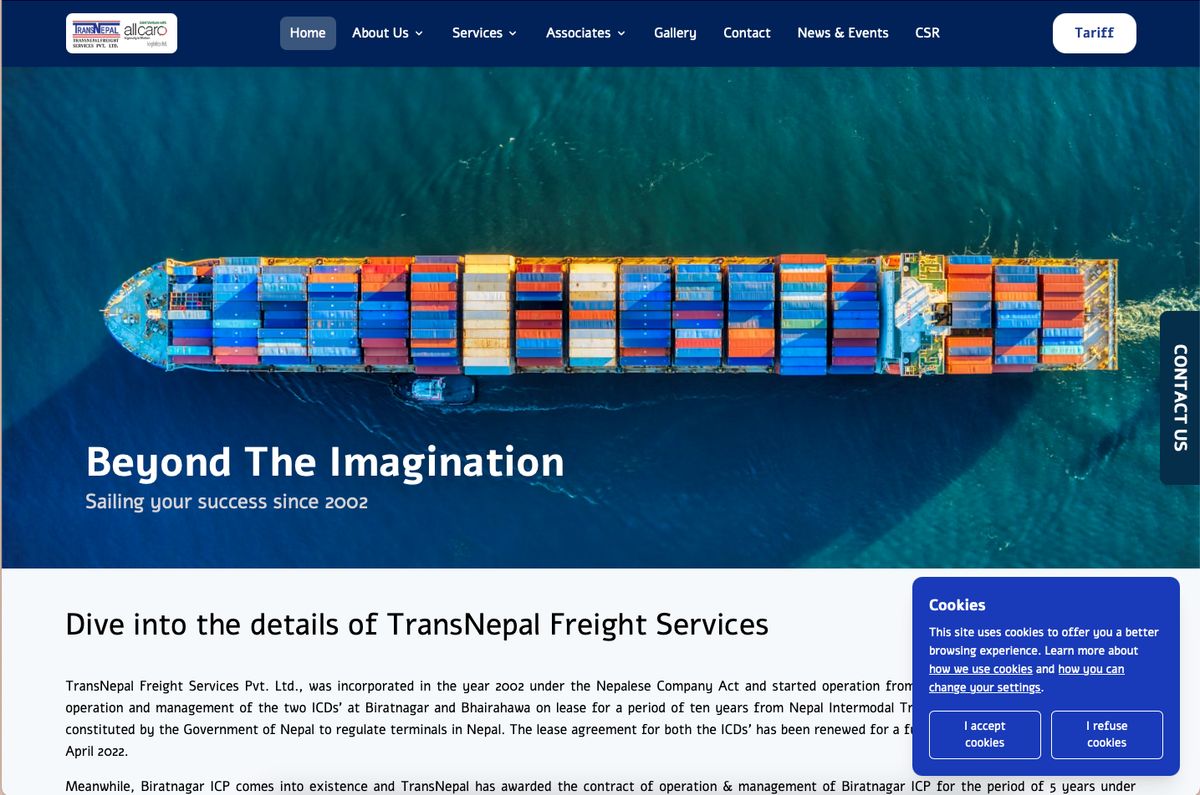
Your cookies policy should be easy to find and written in plain language. Implement a consent banner that appears when users first visit, allowing them to accept or customize their preferences. Being transparent about data collection builds trust with your audience and keeps you compliant with regulations.
10. One Signal Notification
Push notifications through services like OneSignal let you re-engage visitors even after they leave your site. Users opt in to receive notifications, and you can send them updates about new content, special offers, or important announcements.
OneSignal is free for most websites and easy to integrate. Notifications appear on users' devices, bringing them back to your site. However, don't abuse this feature by sending too many notifications. Focus on providing value, whether through timely updates or exclusive content. When used thoughtfully, push notifications can significantly increase repeat visits and user engagement.
These ten elements form the foundation of a professional, well-functioning website that serves both your users and your business goals effectively.